
Development · 6 min read
Setting up our database backups so a coding agent can maintain them
Our backups for self-hosted Supabase and Postgres are configured in a Git repository rather than in a dashboard, so a coding agent has everything it needs to change them. Four months after we last touched the code, adding a new database took about five minutes.
 Ivan Development
12 October 2026 · 6 min read
Ivan Development
12 October 2026 · 6 min read
Earlier this month we added a new Postgres database to our backups. It took about five minutes, and most of that was a coding agent reading the repository. We hadn’t looked at the code since May.
That seemed worth writing up, partly to describe the setup and partly because of one decision we made while building it: almost all of the configuration lives in plain text files in Git, not in the dashboard we also built, because text files are what a coding agent works with best.
The problem
We run a few Postgres databases on one Hetzner VPS, all deployed with Coolify. One is a self-hosted Supabase for a client’s app; the rest are plain Postgres for our own projects.
Supabase’s hosted platform takes care of backups and restores. Self-hosted Supabase doesn’t: you get a Docker Compose stack and the rest is up to you.
Taking a nightly pg_dump is a few lines of shell. What we were missing was everything around it: knowing that last night’s backup really exists offsite, and a way to restore one into a running Supabase without improvising at the worst possible moment. So we built that ourselves, and then went a bit further than we’d planned.
Starting with a script
The first version was a shell script that dumps the database and copies it to a Hetzner Storage Box, and a second one that runs a few hours later to check the newest backup is there, recent and not suspiciously small. If it isn’t, Uptime Kuma lets us know. The schedule lives in the repository, and GitHub Actions installs it on the server, so nobody edits a crontab by hand.
From the start we wrote the repository for two readers: us, six months later, and a coding agent. One file sets the rules an agent should follow (never commit secrets, don’t edit cron directly, update the docs when behaviour changes). Another is the page to read first when you come back after a break, with the commands for checking each part and a list of things that have tripped us up.
That was enough to have backups we trusted. Then we wanted to be able to see them.
Why there’s a Go agent
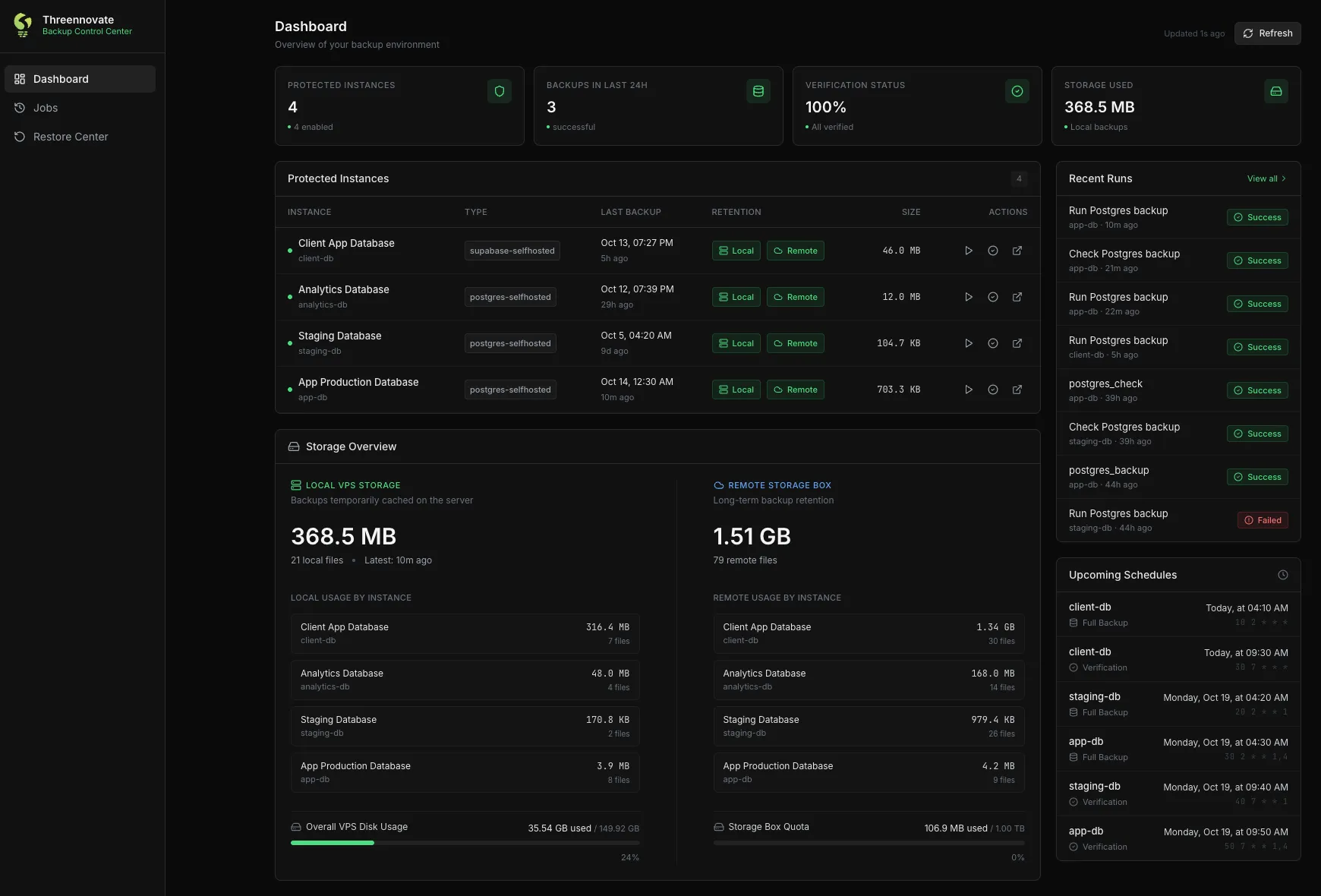
We wanted a dashboard showing which backups exist, where, how big they are and when the next one runs, with a button to run one now.
The catch is that the backup scripts need full access to the server: they reach into other containers, read the credentials and hold the key for the Storage Box. A web app that can run them can, in principle, run anything. Ours would sit behind an auth proxy, but we didn’t want one misconfigured proxy rule to be all that stood between the internet and a shell on the server.
So we split it in two. A small Go service runs directly on the server, and the dashboard, which runs in a container like everything else, can only talk to that service.
The service is really the list of what’s allowed. It doesn’t accept commands, only the names of actions defined in the repository, and each of those maps to one fixed script. It isn’t reachable from outside the server, and it only answers requests carrying a token that the dashboard’s backend holds. Someone who got past the auth proxy could still only do what the dashboard already offers.
We let a coding agent build the first version of both. Once it worked, we pointed cron at the Go service too, so a scheduled backup and one started from the dashboard run through the same code and land in the same history. That’s when the service stopped being an add-on for the dashboard and became the thing that runs everything.
Configuration as files, on purpose
Each database has a short YAML file in the repository. This is one of them, trimmed:
id: app-db
label: App Production Database
type: postgres-selfhosted
enabled: true

# Backups run twice a week; the longest gap is Thursday -> Monday (4 days).
verification:
  max_age_hours: 102
  min_size_bytes: 100000

schedules:
  postgres_backup:
    action: postgres_backup
    cron: "30 2 * * 1,4"
  postgres_check:
    action: postgres_check
    cron: "50 7 * * 1,4"
When we push to main, GitHub Actions updates the repository on the server, rebuilds the Go service and regenerates the cron schedule from these files.
The dashboard can show all of this, download a backup or start a restore, but it can’t change the configuration. We could have built forms for adding a database or editing a schedule, and decided not to. A coding agent is good at reading a folder of YAML and Markdown, making a small change, explaining it in a commit message and testing it. It’s much worse at clicking through a settings page, and a change made that way leaves no diff for anyone to review.
Restoring
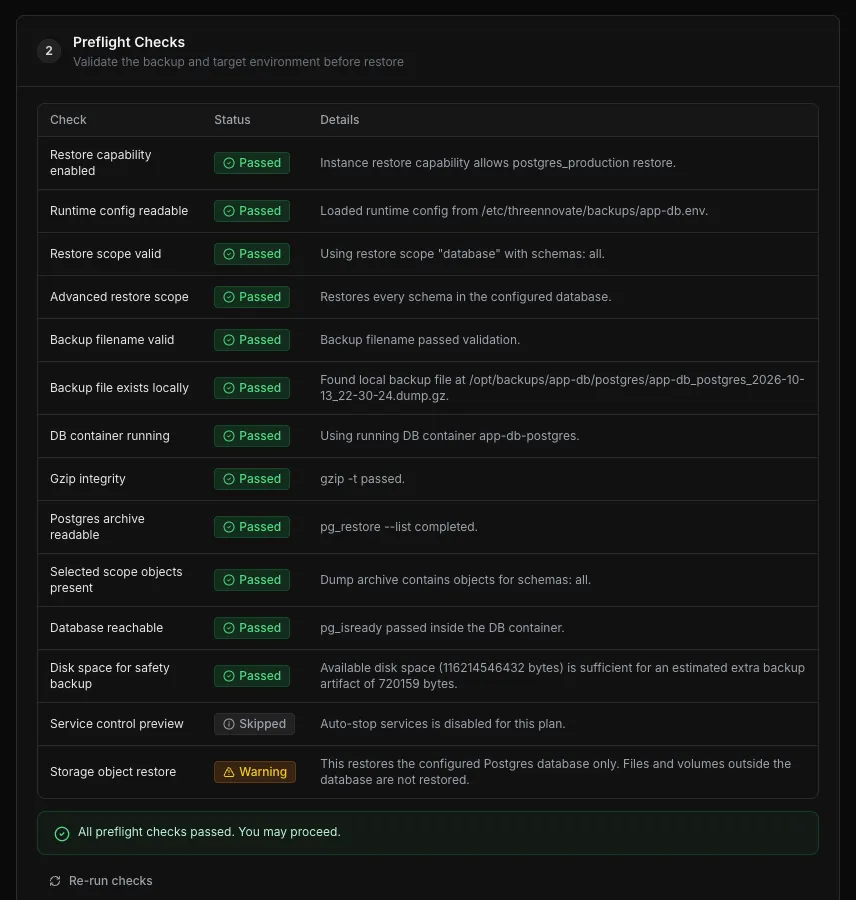
With all of that in place, adding a proper restore was an easy next step. Restoring into a running Supabase is the one operation where a mistake makes things worse instead of better, so we wanted it to be boring: pick a backup, see exactly what’s about to happen, confirm, and know that a fresh backup of the current state is taken first in case we picked the wrong one. It runs through the same Go service and the same dashboard as everything else.
Coming back to it in October
We hadn’t touched the repository since May when we needed backups for a new database, one of our own projects running on the same server.
We opened the repository with Claude Code and asked it to add backups for the new database. The agent followed the instructions in the repository, worked out which container to back up and gave us one command to run on the server to store the credentials, the only step we did by hand. Then it ran a backup and the check, and committed the change.
The whole thing took about five minutes. In the same session it also paused the backups for the client’s database, whose app isn’t in use at the moment, by changing one line. We didn’t have to correct anything.
The agent wasn’t doing anything clever. Everything it needed was already written down in files it could read.
How long it took
Four days in May, with coding agents writing most of the code while we worked on client projects. It’s about 5,500 lines of Go, 3,800 of JavaScript, 1,100 of shell and 4,300 of Markdown.
That’s almost as much documentation as code. We would never have written that much by hand for an internal tool, and it’s the reason the change in October was quick.
A few years ago we wouldn’t have built this at all. Weeks of work on an internal backup dashboard is hard to justify for a company our size, and we’d have kept the script and the crontab. The decisions are still ours: what gets backed up, what a restore is allowed to do, what never goes in Git. What has changed is how cheap it is to carry those decisions all the way through to tests, documentation and a UI.
If you run self-hosted Supabase on one server, you probably don’t need a Go service and a dashboard. The part we’d recommend is the one that made October easy: keep the scripts, the schedules and the instructions in one repository, and write the instructions for whoever opens it next. These days that’s often an agent.